Technical / Tools
Using mesh simplification as a point scatter
How Winternator's icicle generator finds the undersides of a mesh, picks where icicles go, and fuses a pile of cones into one clean mesh, using only Geometry Script.
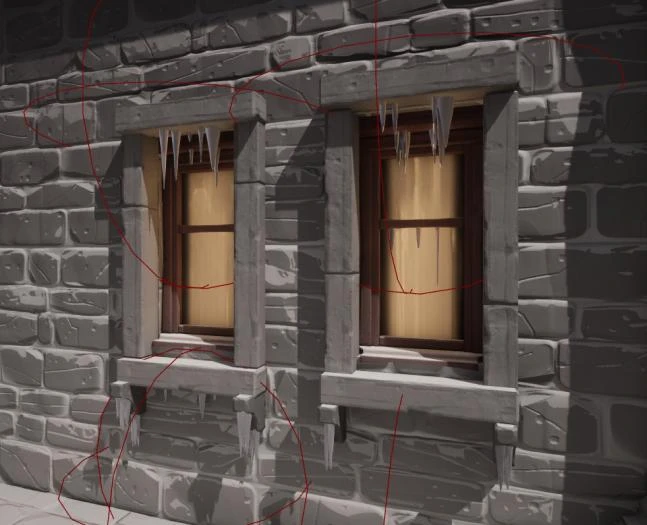
Placing icicles by hand is the kind of job that makes me want to write a tool. Winternator generates them from the mesh you point it at, inside the Unreal editor. This note walks through the icicle generator, including the step I like most: using mesh simplification to decide where icicles go.
Everything below uses Geometry Script in C++. The full source is on GitHub.
1. Find the undersides
Icicles hang from surfaces that face down. The generator copies the chosen static mesh into a temporary dynamic mesh, then makes two selections: triangles whose normal is within 40° of straight down, and triangles inside the generator’s sphere. Intersecting them gives only the downward-facing triangles in the area the artist picked.
FVector Normal;
Normal.Z = -1.0f;

UGeometryScriptLibrary_MeshSelectionFunctions::SelectMeshElementsByNormalAngle(
    TempDynamicMesh, SelectionA, Normal, 40.f);
UGeometryScriptLibrary_MeshSelectionFunctions::SelectMeshElementsInSphere(
    TempDynamicMesh, SelectionB, SelfLocationWorld, SphereRadius);
UGeometryScriptLibrary_MeshSelectionFunctions::CombineMeshSelections(
    SelectionA, SelectionB, TrianglesFacingDown,
    EGeometryScriptCombineSelectionMode::Intersection);
The sphere matters more than it looks. Without it, one building would grow icicles under every ledge at once. With it, the artist can dress one window, then move the generator to the next.
2. Simplify the surface into placement points
The selected triangles are copied into their own mesh and offset by ExtrusionBias, which pushes the surface slightly away from the ledge. Then comes the trick: instead of sampling points across the surface, the generator simplifies the mesh down to PointsToScatter vertices and uses whatever vertices are left.
FGeometryScriptSimplifyMeshOptions SimplifyOptions;
SimplifyOptions.Method = EGeometryScriptRemoveMeshSimplificationType::VolumePreserving;

DynaMesh = UGeometryScriptLibrary_MeshSimplifyFunctions::ApplySimplifyToVertexCount(
    DynaMesh, PointsToScatter, SimplifyOptions);

UGeometryScriptLibrary_MeshQueryFunctions::GetAllVertexPositions(
    DynaMesh, PositionList, false, HasVertexIDGaps);
One number controls the density, and the points always sit on the real surface. Simplification also tends to keep the vertices that define a shape’s outline, which on a ledge means the edges and corners. That happens to be where real icicles form.
3. Hang a cone from each point
Each vertex gets a cone, flipped upside down with a 180° pitch. The base radius and height are drawn from a random stream seeded by RandomSeed, between 20% and 100% of ConeRadius, and between 30% and 100% of ConeHeight.
RandomStream = UKismetMathLibrary::MakeRandomStream(RandomSeed);
// ...
BaseRadius = UKismetMathLibrary::RandomFloatInRangeFromStream(
    RandomStream, ConeRadius * 0.2f, ConeRadius);
TempConeHeight = UKismetMathLibrary::RandomFloatInRangeFromStream(
    RandomStream, ConeHeight * 0.3f, ConeHeight);
A seeded stream keeps the result stable. Regenerating with the same seed gives the same icicles, so an artist can tweak another setting without the whole row changing. Changing the seed gives a new arrangement.
4. Fuse the cones into one mesh
At this point there’s a pile of perfect, overlapping cones. Four passes turn them into something that looks like ice:
- Perlin noise along the normals, at 15% of the cone radius, so the cones stop looking machined.
- Solidify, which rebuilds the mesh from a voxel grid at a resolution of 96. Overlapping cones merge into one closed shell, so there are no buried faces inside other cones.
- Simplify to tolerance, controlled by
DecimationTolerance, to bring the triangle count back down. - Recompute normals for the final surface.
The result is copied into the generator’s dynamic mesh, where it can be frozen once the artist is happy with it.
What I’d change now
- The sphere check uses the actor’s pivot. The generator rejects the target if its pivot is outside the sphere, even when the ledge itself is inside. A large building with its pivot at one corner can’t be dressed at the other end. Checking the actor’s bounds against the sphere would fix that.
- The voxel resolution is fixed. A grid of 96 across a small window gives fine detail, but across a long roofline the icicles go blobby. Scaling the resolution with the sphere radius would keep detail consistent.
- The cones are over-built. Each cone has 24 segments, then gets voxelized and decimated anyway. Far fewer segments would give the same result for less work.